
September 21, 2026 · 5 min read
Amazon product image requirements and size (2026)
Amazon is strict about the main image and flexible about the rest. The full checklist for 2026: the white background rule, image sizes in pixels, file formats, what to put in images 2 to 9, file names for bulk uploads, and the mistakes that get listings suppressed.
By Smit Golakiya · Founder, BrandShots
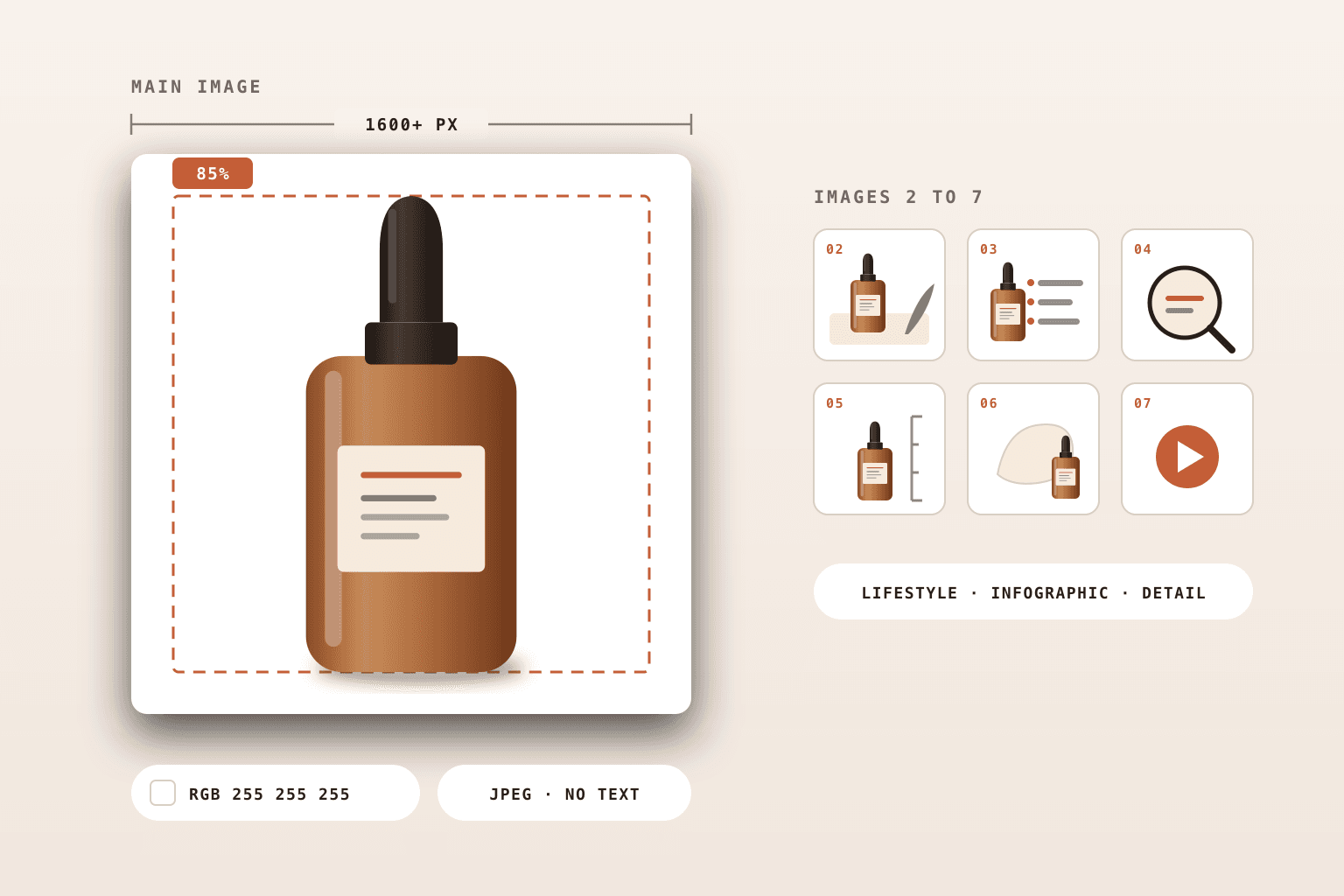
Short answer: Amazon's main image must show the real product on a pure white background (RGB 255, 255, 255), filling at least 85% of the frame, with no text, logos, watermarks or props that aren't included. Upload images at least 1,000 pixels on the longest side so zoom works, and 1,600 to 2,000 pixels in practice. JPEG is preferred, and PNG, TIFF and non-animated GIF are also accepted, as long as each file is under 10 MB and no side is over 10,000 pixels. Amazon recommends at least six images and one video per listing.
A main image that breaks Amazon's rules can get a listing suppressed until it's fixed, so these requirements are worth getting right before launch. None of them need a studio. This checklist covers what Amazon asks for in 2026 and how to meet each rule.
Amazon main image requirements
The main image is the one shoppers see in search results, so Amazon holds it to the strictest standard:
- Pure white background. RGB 255, 255, 255. Off-white, light grey or a subtle gradient can fail the check.
- The product fills 85% or more of the frame. A small product floating in a big white square looks weak in search and can be flagged.
- A real photo of the real product. No illustrations, renders of an item that doesn't exist, or placeholder mockups.
- The entire product in frame. Nothing cropped off at the edges.
- Only what's included in the purchase. No props or accessories that don't ship with the item.
- No text, logos, badges or watermarks. Promotional messaging belongs in the secondary images.
Amazon product image size in pixels
- Minimum: 1,000 pixels on the longest side for zoom. Amazon accepts files down to 500 pixels, but they won't zoom.
- Recommended: 1,600 pixels or more. Many sellers upload at 2,000 × 2,000 pixels so zoom shows fine detail.
- Maximum: 10,000 pixels on the longest side.
- Shape: square (1:1) is the safest choice. It displays cleanly in search results and on mobile without extra white space.
If you shoot on a phone, you already have enough pixels. Most phone photos are well over 3,000 pixels wide, so crop to a square and export at 2,000 × 2,000.
File format, size and color
- Formats: JPEG (preferred), PNG, TIFF, or GIF (not animated)
- File size: under 10 MB per image
- Color: sRGB. Amazon accepts CMYK files too, but sRGB is what screens display, so colors stay predictable.
- iPhone photos: convert HEIC files to JPEG before uploading
What to put in images 2 to 9
Most listings take up to 9 images, and Amazon recommends at least six plus a video. The secondary images have looser rules: lifestyle backgrounds, text and graphics are all allowed. A set that answers buyer questions usually includes:
- Lifestyle: the product in use, in a setting your buyer recognizes
- Infographic: key features or benefits called out on the image
- Detail: close-ups of texture, materials, finish or closures
- Scale: the product next to a hand or a familiar object, or with dimensions marked
- What's in the box: every included item, laid out together
- Variants or comparison: sizes, colors or how it differs from similar products
We map each slot to a specific image type on the BrandShots page for Amazon sellers.
Category rules
Some categories have their own style guides on top of the general rules. Clothing, shoes, jewelry, beauty and grocery all come with extra requirements, such as how garments must be shown. Check the style guide for your category in Seller Central before a launch. If you sell clothing, our guide to AI model photos for clothing brands covers on-model images.
File names for bulk uploads
When you upload images in bulk through Seller Central, Amazon matches files to products by name. Use the product identifier (ASIN, UPC, EAN, ISBN or JAN) with no spaces or dashes, then a variant code, then the file extension, separated by periods:
- Main image:
B0XXXXXXXX.MAIN.jpg - Secondary images:
B0XXXXXXXX.PT01.jpg,B0XXXXXXXX.PT02.jpgand so on
Extra characters like underscores or spaces stop a file from being processed.
Can you use AI-generated images on Amazon?
Yes, with limits. Amazon allows AI for backgrounds, lighting and lifestyle scenes built around your real product, but the main image still has to be a true photo of what ships. We cover where the lines are in AI images on Amazon listings.
Why Amazon suppresses listing images
The most common reasons a main image gets flagged:
- The background isn't pure white (a light grey or cream tint is enough to fail)
- Text, a logo, a badge or a watermark on the main image
- Props or accessories that aren't included in the sale
- The product is too small in the frame
- The image is blurry, cropped or too small (Amazon's floor is 500 pixels, and zoom needs 1,000)
- A drawing or mockup instead of a real photo
How to make Amazon-ready images without a studio
Shoot the source photo on your phone (here's how) and let AI handle the rest. BrandShots turns one product photo into a pure white main image at spec, lifestyle scenes for the secondary slots and infographic images, with your brand kit applied. The full seven-image workflow is on the Amazon sellers page.
Amazon updates its guidelines from time to time, so treat Seller Central's image requirements and your category style guide as the final word before a major launch.